The Editor
Requirements
Reminder: Hover your mouse over almost any input, field, selectionbox or button in the Editor to receive tooltips and examples.
Table of contents
Requirements
Requirements can check for items in your inventory, skill levels, ongoing quests, music that is playing, the value of a game variable, whether or not an entity knows an ability and many more!
Requirements are used in the context of Dialogues and Events.
When a Requirement is met, you can display more Dialogue, or Dialogue Options. Or you can decide if you want to execute an Event or not. From a programmer's perspective, Requirements are 'If-statements'.
Creating Requirements
Requirements as part of Events are also handled within the page for EventBits.
Below, we will use Dialogues as our basis to create them, but the system works the same for both.
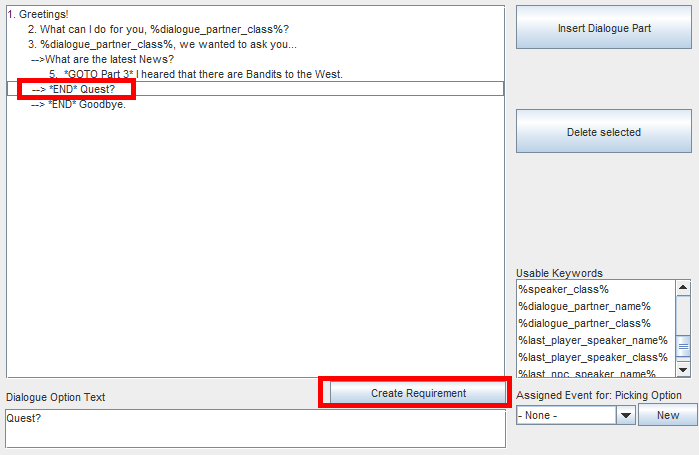
Requirements in Dialogues are useful for e.g. Quests: Only show a specific Dialogue Option if the player has e.g. 10 items.
In Dialogues, you can create Requirements for Dialogue Parts and for Dialogue Options. When the Requirement is met, then the Dialogue Part will be shown, and the Dialogue Option will become available for the player to choose. If the Requirement is not met, the Dialogue Part will be skipped (which may end the dialogue if nothing else comes after) and the Dialogue Option will simply not appear.
To create a Requirement, select either a Part or an Option, then click the button. In this example, we will create a Requirement for a Dialogue Option.

Every Requirement-Type is explained in a tooltip. Experiment with them, try them out.
When creating/editing Requirements, you will see this window. First, add a new Requirement with the 'New'-button.
While selecting it, click on the dropdown in the top-middle to select the type of Requirement you want it to be. In this example, we pick 'Skill'. Therefore, we are doing a skill-check.
The selectors and lists now allow you to choose the skill to check for, the Entity who will be checked for this skill, and the success-parameters.
In the example on the left, the check is successful if at least one player character has this skill at level 1 or higher.
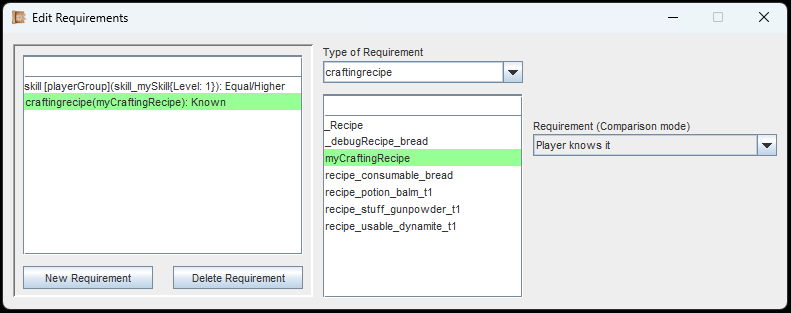
Multi-Requirement setup. All checks must be successful for something else to happen.
You can add as many Requirements as you want. Here, we add a check for a crafting recipe.
If the player knows the selected recipe, the check will be successful.
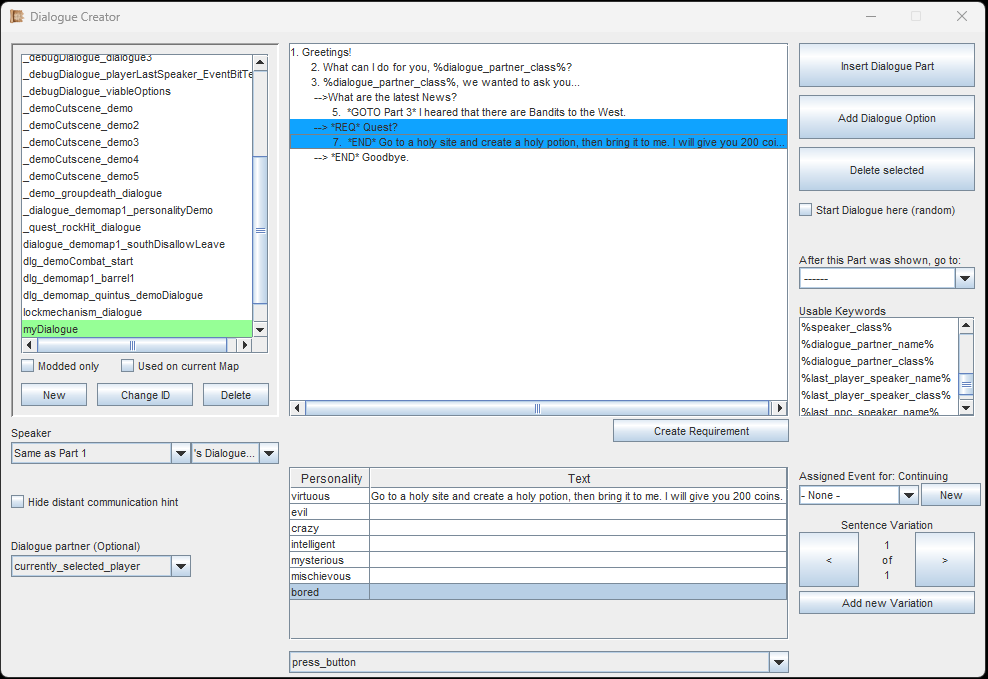
Make sure there is always a way to complete a dialogue, even if all Requirements failed.
In our example, we added the Requirements to a Dialogue Option.
The dialogue tree will now highlight the affected Option (and its children - the following Parts) in shades of blue.
You can have as many Requirements in your Dialogues as you wish, but you should make sure, there is always one possible way to play out the dialogue, even if all checks fail. If your structures get complex, the Editor will show a yellow warning sign to inform you about this.
How it looks like in-game
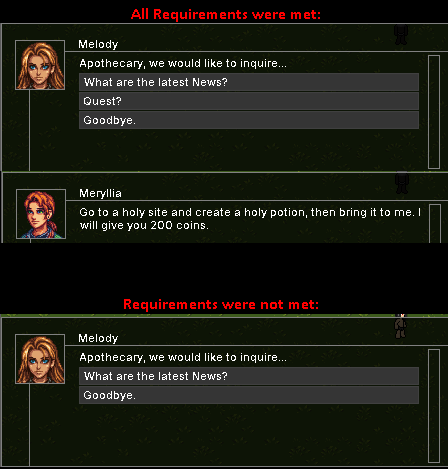
An example of how Requirements work in action.
In this image you can see the result of what we configured above. If the Requirements are not met, the 'Quest?'-Option does not appear.
All Requirement Types
This is a list of all the requirements to check for. The parameters to check for vary between them.
ability
Checks if an Entity or the Playergroup possess the specified Ability.
skill
Checks if an Entity or the Playergroup possess the specified Skill at the specified Level.
item
Checks if an Entity or the Playergroup possess the specified Item at the specified amount.
Since all player characters share a common inventory, checking for one player character is functionally the same as checking for the entire group.
entityID
Checks if an Entity has the specified EntityID
To check for players, use the Requirement 'isPlayer' instead.
equipment
Checks if an Entity or the Playergroup have the specified Item equipped.
equipment_slot
Checks if an Entity or the Playergroup have something equipped in the specified Equipment-Slot.
equipped_weapontype
Checks if an Entity or the Playergroup have a weapon of the specified type equipped.
buff
Checks if an Entity or the Playergroup have the specified buff on them.
baseAttribute
Checks if an Entity or the Playergroup have the specified number of points in the specified base attribute.
baseAttribute_percentage
Checks if an Entity or the Playergroup have the specified percentage of HP/MP/ENP.
attribute
Checks if an Entity or the Playergroup have the specified number of points in the specified NON-base attribute.
The ATK- and DEF-values are always both considered.
hiddenAttribute
Checks if an Entity or the Playergroup have the specified number of points in the specified hidden attribute.
A hidden attribute can be created in the Editor, and behaves like a non-hardcoded base attribute.
craftingrecipe
Checks if the Player knows the specified crafting recipe.
quest_inQuestLog
Checks if the Player has the specified quest in their questlog.
quest_finished
Checks if the Player has already finished the specified quest.
gameVariable_value
Checks if the Value of the specified Gamevariable is the same (or in the same range) as specified.
gameVariable_string_equal
Checks if the String of the specified Gamevariable is the same as specified.
gameVariable_string_contains
Checks if the String of the specified Gamevariable contains the specified String.
personality
Checks if the Personality-type of the specified Player-Character equals the specified type.
This only works for player characters. The check will fail for all other Entities, as only the player characters can have a Personality-type.
level
Checks if an Entity or the Playergroup have reached the specified level.
gold
Checks if the Player has the specified amount of gold (coins/currency).
carryWeight
Checks if the Playergroup carries specified amount of weight with them.
maxCarryWeight
Checks if the Playergroup's maximum carry weight equals the specified amount of weight.
isPlayer
Checks if the specified Entity is a player character.
combatActive
Checks if Combat is currently active.
combatTurnEntity
Checks if the current Combat Turn belongs to the specified Entity.
Will fail if Combat is not active, or if the Entity is not valid (e.g. selecting the whole playerGroup).
musicPlaying
Checks if any Music is playing.
musicPlayingTrack
Checks if the specified Music is playing.
currentMap
Checks if the player's current Map is the same as the specified Map.
random_chance
A certain chance can be specified, and the random outcome decides if the Requirement was successful or failed.
lightlevel
Checks if an Entity or the Playergroup have the specified amount of light on them.
timeHour
Checks if the current time (hours only) is equal to the specified time.
immuneToScriptEffects
Checks if an Entity or the Playergroup has the flag 'Script-Effect Immunity' set in the Entity-Editor.
objectAtEntityPosition
Checks if there is an Object at the position of an Entity or the Playergroup.
(Does not check for Entities or Items)
entityIsMoving
Checks if the Entity or the Playergroup is currently moving or is inbetween tiles.
localVar_Entity
Checks if an Entity or even the whole Playergroup have a certain Local Variable with the specified name and value on them.
localVar_Object
Checks if an Object (from a UID, or from_this_event) has a certain Local Variable with the specified name and value on it.
viableDialogueOptions
Checks if the specified Dialogue contains the specified number of viable Dialogue-Options that the player would currently see.
This can be used for showing an animation on quest boards. When at least one Dialogue-Option is available (1 quest) then the board could show an indicator for this.
animation_onEntity
Checks if an Entity or the Playergroup have the specified animation attached to them.
This can be used with equipment that causes a visual effect on the Entity. When unequipping and re-equipping an item, this check can be used to make sure the same animation is not played twice.
is_stealthed
Checks if an Entity or the Playergroup is currently in Stealth-Mode (via the 'Entity_SetStealth'-EventBit).
entity_isTransformed
Checks if an Entity is currently transformed (via the 'Entity_Transform'-EventBit).
player_in_entityID_faction
Checks if the player is in the faction of the specified Entity ID.
can_switch_GroupFollowing
Checks if the player is currently allowed to Enable/Disable Group-Following (done via the EventBits 'Player_GroupFollow_enable' and 'Player_GroupFollow_disable').
game_paused
Checks if the game is paused.
The game can be paused by a cutscene or when inside of a menu.
uid_onCurrentMap
Checks if the specified UID (Unique ID) is present on the current Map, either as an Entity or an Object. Don't forget to include the prefixes (ENT#, OBJ# or EVENT_OBJ#).
All Entity Targets
This is a list of all possible selections you can make for an Entity. When you want to check for a skill or an ability, you also need to select the Entity for which you want to check this. Not all Requirements need this, but some do.
playerGroup
The whole player group is checked at once, and all characters must pass the checks for the Requirement to be successful. If one player character is disabled via the 'Player_Set_Disabled'-EventBit, they are skipped for the check.
currentlySelectedPlayer
The Entity will be the player character that is currently selected by the player.
from_this_event
Not available for Dialogues. Events: If this EventType supports it, this option will refer to an Entity (e.g. the target of an Effect). You can check this in the Event Creator.
from_GameVariable
Will attempt to read an Entity's ID from a Gamevariable and then search for an Entity with that same ID on the current Map. If there is more than one Entity of the same ID, only the first one will be picked. The player characters' IDs are unique and saving a player Entity in a Gamevariable should always work.
from_this_event_partner
If this EventType supports it, this option will also refer to an Entity (e.g. a dialogue partner, or the caster of an Effect). You can check this in the Event Creator.
from_UID
The Entity will be found via their unique ID (UID). A UID is assigned to an Entity when it is placed on the Map in the Map-Editor. UIDs are unique per Map, so you cannot refer to a UID of a different Map than the current Map.
lastPlaced
Refers to the Entity that was last placed via the 'Entity_Place'-EventBit.
player1
The Entity will be the respective player character.
player2
The Entity will be the respective player character.
player3
The Entity will be the respective player character.
player4
The Entity will be the respective player character.
player_lastSpeaker
Refers to the player character who last spoke in a Dialogue.
from_aimedTile
Whenever the player is aiming with the mouse (due to an Ability or Item that requires it), this Option becomes usable, and will refer to the Entity that is standing on the tile that the player aimed at. This Option works best with EventType Effect → 'on_effect_start' and EventType Projectile → 'on_projectile_hit'.
If you are following the Guide, continue with Gamevariables.