Adventures of Conquest
Combat
Table of contents
Overview of Combat
Adventures of Conquest has tactical, turn-based combat. All involved player characters and hostile NPCs get one turn per round, in which they can move, attack, defend, use items or cast abilities. Defeating enemies will yield experience (EXP) and loot, which can be collected from the ground.
During Combat, the movement keys (default: WASD) will move the camera instead, within the boundaries of the ongoing fight. Movement is done by clicking on the target tile with the mouse.
Initiating Combat

There are multiple ways to enter Combat. Most commonly, a player characters enters the line of sight of a hostile NPC. The NPC will then attempt follow the player until they reached a certain distance, after which Combat is initiated automatically.
The player can also move behind a hostile NPC and perform a surprise attack, which does weapon damage with an improved critical strike chance. Combat is started immediately after the damage has been dealt. This only works once per NPC though, and only if they haven't noticed you for at least 30 seconds.
Hostile NPCs will alarm other hostile NPCs within a certain radius. Alarming is vocal, and does not go through walls. The radius differs between various NPC types.
Rounds, Turns & Order
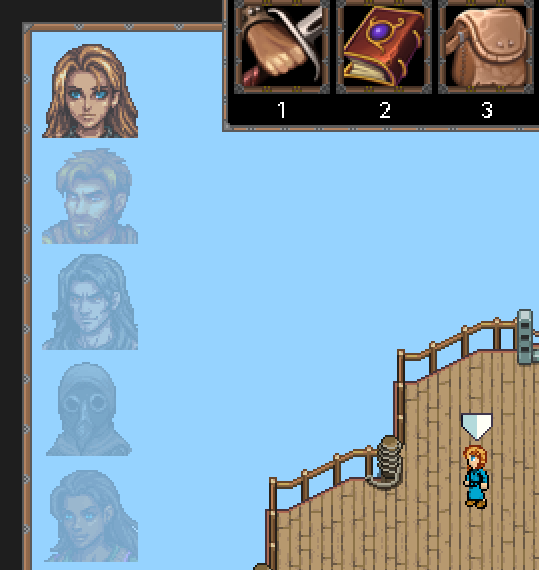
The combat participants are displayed in order of their turns.
Combat always happens in rounds. In each round, each participant gets one turn. The order of their turns is determined by a hidden attribute 'Combat Turn Speed'. This attribute can only be improved via Equipment, Items and Buffs.
By default, the order of the upcoming combat participants is displayed on the top-left side of the screen.
Movement
During their combat turn, every participant may only move a certain number of tiles. A left-click on the desired tile will do everything automatically. The movement range is determined by a hidden attribute 'Combat Movement Range', which can only be improved via Equipment, Items and Buffs.
Movement is important, as most attacks, abilities and offensive items are limited in their range, so getting closer or further away from an enemy is the key to winning.
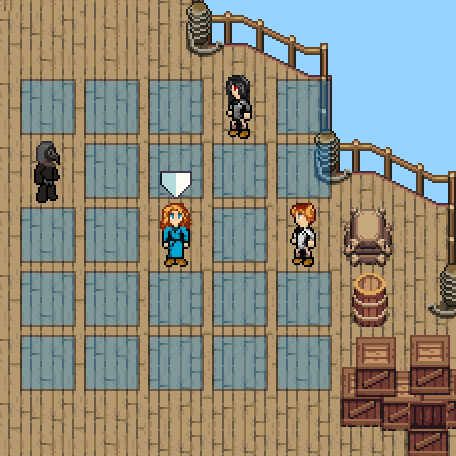
This selected player character can move 2 tiles. Path finding is done automatically.
Combat Actions
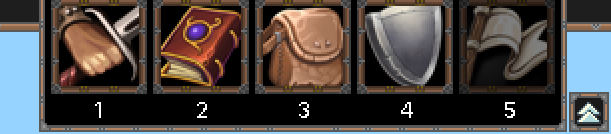
The combat action menu can also be minimized via the little arrow button on the right side.
During Combat, an action menu appears at the top of the screen. The buttons can either be clicked, or the corresponding number can be pressed on the keyboard.
There are powers that may prevent certain actions temporarily, but for the most part, these combat actions are as follows (see below).
Direct Attack
Performs an attack with the currently equipped mainhand-weapon, or with just your fists if no weapon is equipped.
Abilities

Opens up a menu from which you can select an ability to cast.
Items

Opens up a menu from which you can select an item to use.
Defensive Stance

Take a defensive stance, brace for impact and reduce the damage of the next incoming attack by 25%. This is the default way to end a combat turn if you cannot do anything else. The amount of reduction can be increased through a hidden attribute called 'Defensive Stance', which can only be improved via Equipment, Items and Buffs.
Flee

Will attempt to surprise your enemies by fleeing from Combat. If successful, all player characters line up and you get a few seconds to remove yourself from the scene. Fallen player characters regain 1 HP. The success of fleeing depends on the number of enemies you are facing, and how much higher their level is compared to your player group average. If your attempt fails, your turn simply ends.
Second Attack / Continue Channeling

If you are holding two one-handed weapons, you may attack a second time with your off-hand. You can also move to another position before your next attack, if you have movement left.
If you are currently channeling an Ability, this action will continue channeling.
Cancel Channeling

If you are currently channeling an Ability, this action will cancel channeling. You then may immediatly choose a new action.
End Turn without Action

If some power prevents you from taking a defensive stance, or if you have two one-handed weapons but only want to attack once, this here will end your turn without any further action.
Damages and Resistances
There are two main types of damage: Normal damage, and attribute-type damage.
Normal Damage
When attacking with a weapon that causes normal damage (or with your fists), your damage is roughly calculated this way:
((Weapon damage + Physical Attack Attribute) - Target Physical Defense Attribute)
The numbers change with the given attribute points, equipment and ongoing (de-)buffs.
Attribute-Type Damage
Most abilities and some weapons cause special damage types, e.g. Fire, Poison, Dark Magic etc.
These damages are only slightly mitigated by the physical defense attribute, making them very effective against traditional armor.
However, they are easy to mitigate via their respective Resistances, which always work percentage-based.
Attribute-type damage is roughly calculated this way (using Abilities as example):
(((Ability damage + Corresponding Attribute) - 10% Target Physical Defense Attribute) reduced by X% Target Corresponding Resistance)
The numbers change with the given attribute points, equipment and ongoing (de-)buffs.
Hit Chance and Critical Strike Chance
Hitting your target, and achieving a critical strike is determined via certain attributes, see below.
Hit Chance
For all weapons and for most Abilities there is a chance to hit or miss the target.
The hit chance is influenced by two attributes: The attackers precision, and the targets evasion.
The hit chance is roughly calculated this way:
(0.75 ^ (Targets Evasion / Attackers Precision))
This means that, if both attacker and target have the same number of points in their respective attributes, the hit chance for the attacker is at 75%. It gets lower when the targets evasion becomes higher.
Critical Strike Chance
Every successful attack or ability has the chance for a critical strike, which will cause 50% more damage.
If the ability is friendly, its Effects will be 50% better for the rest of its duration.
The chance for a critical strike is determined via the Critical Strike Attribute (always percentage based) of the attacker, multiplied with a factor of 0.35 .