The Editor
Textures and Audio
Table of contents
Textures
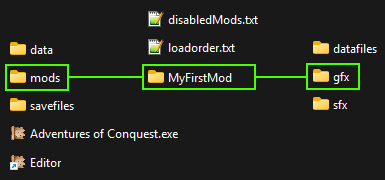
Go into /mods/YourMod/gfx/ to find the texture folders.
Go into your own mod folder, then into 'gfx'. In there, you will see where all your textures will go, if you want to use your own.
You can mod with the textures that come with the vanilla game, so adding your own textures is optional.
Textures must be in the .png format.
Texture Folders Overview
There are 13 texture folders, that are all used for different things. Here is a quick overview of what they are for.
If any of this confuses you, don't worry: All of this is optional, you can start with the textures the game already has.
Need examples? Go into the 'data'-folder (in the same directory where the game is installed) to see how the vanilla game textures look like.
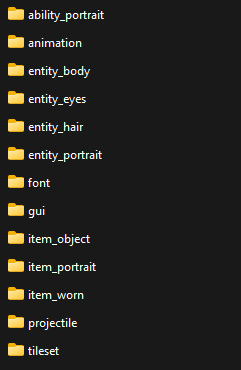
The folder structure inside of the gfx folder in your mod.
ability_portrait
Contains textures for the portraits for abilities. A single portrait is 32x32 pixels, but you can put multiple in one file (as a tilesheet).
animation
Contains animation frames, or even just singular images. There are no size constraints, but keep in mind that it needs to still fit on the game screen.
entity_body
Contains the textures for the bodies of players and NPCs. There are 5 textures for one body and each is 32x32 pixels. So, one 'Set' of a body is 160x32 pixels. You can put multiple Sets in one file (as a tilesheet). If the file has the prefix 'player_' it will be available during character creation.
entity_eyes
Contains the textures for the eyes of players and NPCs. There are 5 textures for eye styles and each is 32x32 pixels. So, one 'Set' of eyes is 160x32 pixels. You can put multiple Sets in one file (as a tilesheet). If the file has the prefix 'player_' it will be available during character creation.
entity_hair
Contains the textures for the hair of players and NPCs. There are 5 textures for one hairstyle and each is 32x32 pixels. So, one 'Set' of hair is 160x32 pixels. You can put multiple Sets in one file (as a tilesheet). If the file has the prefix 'player_' it will be available during character creation.
entity_portrait
Contains textures for the portraits for players and NPCs. A single portrait is 48x48 pixels, but you can put multiple in one file (as a tilesheet). If the file has the prefix 'player_' it will be available during character creation.
font
Not strictly a texture, but you can put a .ttf file in here to replace the game font. This requires some knowledge from the next part though, Mod Configuration.
gui
You can put replacement textures for the GUI (graphical user interface) of the game in here, completely changing how the UI looks like. This requires some knowledge from the next part though, Mod Configuration.
item_object
Contains textures for how items look like when they are on the Map. A single item texture is 32x32 pixels, but you can put multiple in one file (as a tilesheet).
item_portrait
Contains textures for the portraits for items, visible when you hover over them with the mouse. A single portrait is 32x32 pixels, but you can put multiple in one file (as a tilesheet).
item_worn
Contains the textures of how the item looks like when it is worn by players and NPCs. There are 5 textures for all positions and each is 32x32 pixels. So, one 'Set' of a worn item is 160x32 pixels. You can put multiple Sets in one file (as a tilesheet).
projectile
Contains textures for projectiles, which are cast by an Effect or shot by a long-range weapon. The most top-left pixel (x=0, y=0) is rotated to the projectile's target by default. A single projectile texture is 32x32 pixels, but you can put multiple in one file (as a tilesheet).
tileset
Contains textures for creating Maps. A single tile is 32x32 pixels, and since the game supports a bottom- and top-layer, you can have tiles with transparency around them for e.g. wall decorations. You can put multiple textures in one file (as a tilesheet), and usually one file is one theme. Bigger files take longer to load, so if that is the case, you might want to split them up.
Audio
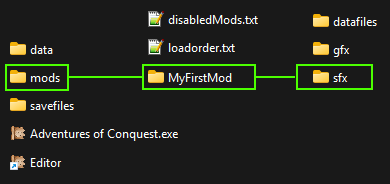
Go into /mods/YourMod/sfx/ to find the sound and music folders.
Go into your own mod folder, then into 'sfx'. In there, you will see where all your music and sound files will go, if you want to use your own.
You can mod with the audio that comes with the vanilla game, so adding your own audio is optional.
Audio must be in the .mp3, .ogg or .wav format.
Audio Folders Overview
There are 2 audio folders, used for Music and Sounds.
If you don't want to deal with this right now, don't worry: All of this is optional, you can start with the audio the game already has.
Need examples? Go into the 'data'-folder (in the same directory where the game is installed) to see how the vanilla game audio is stored.

music
Contains the music. Music usually loops in the background. But looping ambient noises can also go here. Basically, if the audio is long, it most likely will go in here.
sound
Contains the sound effects. These are usually short, don't loop and happen more frequently. The Editor has the option to randomly change the pitch for selected sounds, which adds a bit of variation.
If you are following the Guide, continue with the Mod Configuration.