The Editor
Mods of Mods
Reminder: Hover your mouse over almost any input, field, selectionbox or button in the Editor to receive tooltips and examples.
Table of contents
What is a Mod of a Mod?
Instead of making a Mod for the vanilla game, you can also make a Mod of another Mod. In the load order, it must be loaded after the Mod it is based on.
Why would you need a Mod of a Mod?
There are 3 reasons why its useful:
- Extending an existing Mod from someone else (e.g. a Mod for a total conversion)
- Coop Modding with multiple people
- Testing new content for your main Mod without making direct changes to it
How to create a Mod of a Mod
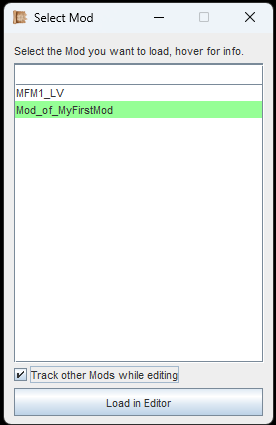
Select your Mod of a Mod, then "Track other Mods while editing".
To make things a little easier to explain, we will refer to the Main Mod as the Primary Mod, and the Mod of a Mod as the Secondary Mod.
In the example image to the left:
My Primary Mod is called 'MFM1_LV' (MyFirstMod). We will track it.
My Secondary Mod is called 'Mod_of_MyFirstMod'. We will edit it.
All you have to do is to select your Secondary Mod and the checkbox 'Track other Mods while editing'.
Then click on the button to continue.
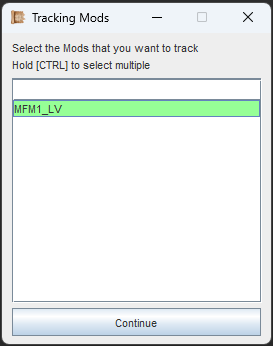
Select all primary Mods your own work will be based off of.
Next, you have to select the Primary Mod your work will be based on.
You can select multiple, if needed. But keep in mind, that these will all end up being dependencies to your Mod.
Click on the button to continue with the loading process.
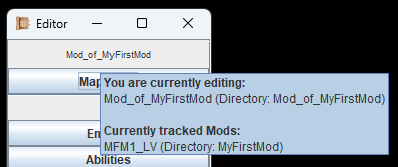
Hover the Mods name in the Editor menu to see some useful information.
Once the Editor has finished loading, you can hover your mouse over the Mod name in the Editor menu.
The tooltip will show you your own Mod and all the primary Mods you are using.
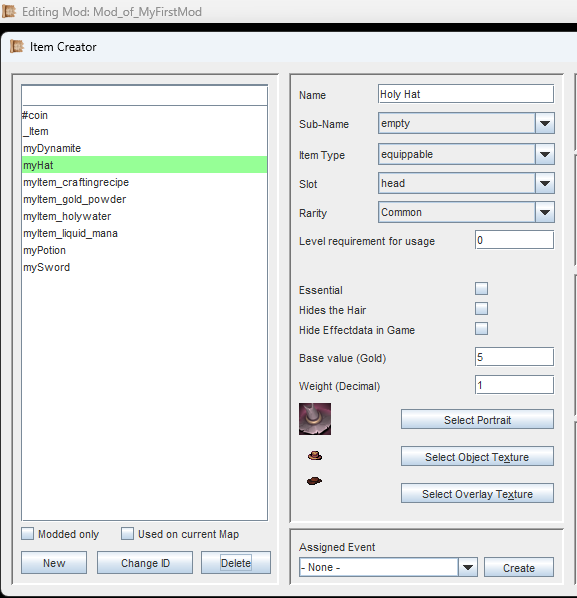
In this example we can see that the "myHat"-item from the primary Mod is available within our secondary Mod.
In addition to all the vanilla game content you would normally see in the Editor, you will now also see all the Primary Mod's contents, as if they were vanilla.
You can use them, change them, duplicate them - The
Primary Mods will be completely unaffected. All your changes are merely stored in your Secondary Mod.
Only keep the following in mind: You can edit content from a Primary Mod but you cannot delete content from a Primary Mod.
If you do so, deleted primary content will be back when you start the Editor again.
What happens to Mod contents when a Mod is gone?
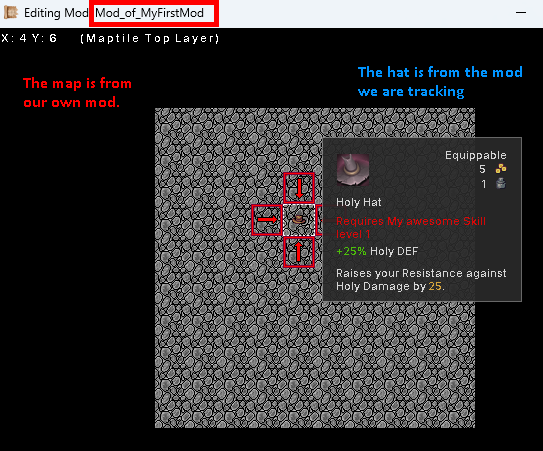
A Map from the Secondary Mod with an Item from a Primary Mod.
Look at the example image to the left. In our Secondary Mod we have created a Map. On this Map we have placed an Item. The Item is from the Primary Mod (the one we are tracking).
So far, no problem. Since the Secondary Mod is dependent on the Item from the Primary Mod, that means we need both Mods loaded when we want to see the complete content.
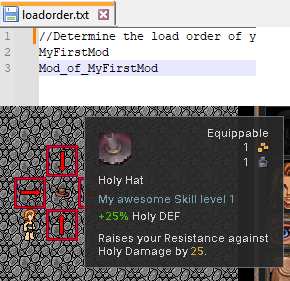
Keep the load order in mind when working with Mods of Mods.
In our load order, we need to ensure that our Secondary Mod is loaded after the Primary Mod.
With this configuration, we can test it in-game. It should work without issues.
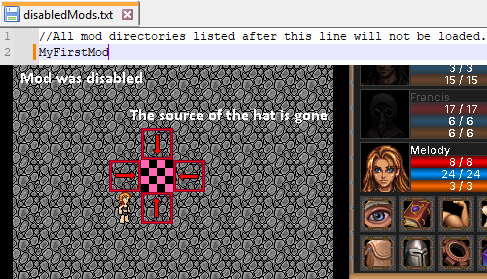
Dependency issues can manifest as error textures.
What happens now, if our Primary Mod is removed? To simulate this, I simply added it to the 'disabledMods.txt', so when I start the game, it won't be loaded.
We can now see that the Item is gone, and an error texture came up. The game will not crash, but it will show the error texture to indicate that you encountered a dependency issue.
What happens when you forget to track your primary Mod in the Editor?
Imagine this scenario: You are creating a Mod of a Mod. However, one day you forget to activate Mod Tracking and you work on your Mod (stand-alone basically) for an hour before you notice.
What happens if you save now? Did you just break your dependent contents?
The answer is: You can save normally, nothing breaks on its own.
The worst thing that can happen is, if you make a change to something with a dependency to the primary Mod (e.g. setting a required Skill in an Item) you may simply not find what you are looking for and end up making an accidental change to it. This is something you have to revert later.
Simply save, restart the Editor and activate Mod Tracking. Everything will be back, and you only have to check on that thing you couldn't find earlier and revert it. Its really not a big deal.
If you are following the Guide, continue with Coop-Modding.