The Editor
Setup
Table of contents
Starting the Editor
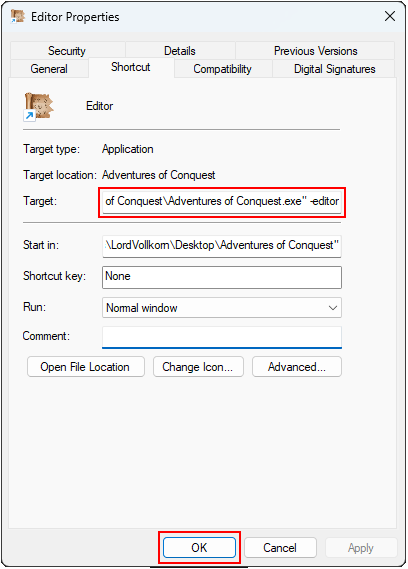
Editing the Shortcut's properties, then adding the '-editor' parameter to the target, and finally pressing OK.
- Locate the directory where Adventures of Conquest is installed.
- Create a shortcut to the 'Adventures of Conquest.exe' file.
- Right-click the shortcut and select 'Properties'.
- At the end of the 'Target'-path after the apostrophe, add a space and write -editor.
- Apply or press OK.
- (Optional) Rename your Shortcut to something like 'Editor'
To start the Editor, simply run your Shortcut with the -editor parameter that you made. If you see something like on the image here, you are good to go!
You may get a message window, depending if there are already mods in your mods directory or not.
Don't do anything else on this screen for now, all further steps are explained in the next part, Setting Up your Mod Folder.
You may close the Editor for now, we will open it back up later.

If you see one of these, your Editor has started successfully.
Other useful starting options
Besides the -editor parameter, there are also others that are very(!) useful for modding. The first few steps remain the same for everything.
- Locate the directory where Adventures of Conquest is installed.
- Create a shortcut to the 'Adventures of Conquest.exe' file.
- Right-click the shortcut and select 'Properties'.
- At the end of the 'Target'-path after the apostrophe, add a space and use the following keywords:
-dev
Starts the game with developer tools enabled, which you can access in the pause menu (press ESC).
These tools help you to quickly add Items, Abilities, Skills, Attributes etc. and allow you to go to any Map.
It also bypasses the 'Are you sure?' dialogue when you want to exit the game, allowing you to close it faster. This parameter is absolutely essential for testing. (Technically also a cheat code, but then you just ruin your fun.)
-load1
Skips the main menu and immediately loads the first save file.
You can replace the 1 with any number up to 9 (e.g. -load9) to load the corresponding save file.
To find out the number, just open the game, look at the loading menu and count from the top.
Super useful for quick testing.
-dev -load1
You can combine these parameters (dev and load), and I recommend doing so.
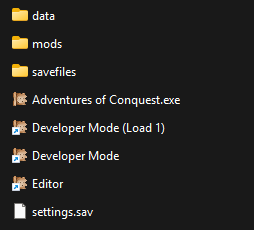
How your game folder may look like with all the Shortcuts done.
In the end, you should have at least three or four shortcuts like this. Super convenient for later.
If you are following the Guide, continue with Setting up your Mod folder.