Adventures of Conquest
Installing Mods

Table of contents
Introduction to Mods
Adventures of Conquest is built from the ground up to support Mods, and it comes with its own easy-to-use Modding Tools.
Modding Adventures of Conquest works very similar to modding games like Skyrim or Fallout:
- It's safe. You can't break your game files. Mods override vanilla content, but the original files are never altered.
- Mods can make changes to vanilla content (or bypass it), but won't ever truly delete it.
- Changes to maps, items, NPCs etc. are merged into your save-file. No need to start a new game.
- If a mod is deleted or deactivated, its contents simply disappear. Your save-file won't break. If you were on a modded map, you are teleported to the vanilla base camp.
- Installing and removing mods leaves no trash on your hard drive or in your save-file.
- Mods can replace textures, sounds, text, the UI and much more. And all of it can be reverted easily by disabling the mod.
- Mods are light-weight. Only if they contain a huge amount of textures or audio, they may increase in size.
Installing a Mod
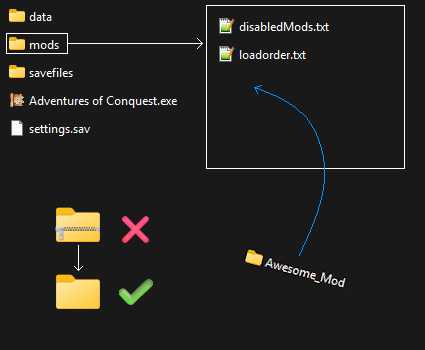
Simply drop the (unzipped) mod into the 'mods'-directory. The 'mods'-directory should already contain two .txt-files by default.
Installing a mod is very easy. Simply place the mod into the 'mods'-directory, where the game is installed.
The 'mods'-directory is created automatically when starting the game. So if you don't see it yet, start the game at least once.
The mod itself should also just be a directory. If it comes zipped (.zip, .rar, .7zip etc.) then unzip it first.
You can check inside of the mods own directory, and should find three additional folders: "datafiles", "gfx" & "sfx". If you see these, then it is indeed a working mod.
Renaming mods
You can rename the mod directories without any negative impact. It won't break the mod or it's dependencies.
Renaming the mods you downloaded may help you sort them better. E.g. you could add the prefix 'items_' to mod directories that add new items to the game.
The only thing you may need to keep in mind, is the Load Order and Mod Disabling. More on that below.
Load Order & Disabling
Load Order
Installing a mod as described above should work fine in most cases, with no additional changes needed. However, there may also be cases in which you want to control which mod is loaded first, second, third etc.
An example: The vanilla game contains an item called 'Adventurer's short sword". You install two mods, and each one changes the item name. Which mod will win, and what item name is displayed? Always the mod that is loaded last. The later mod overrides the previous mod.
Inside the 'mods'-directory, you will find a file called 'loadorder.txt'. Open this file with a text editor. You will find all the mods in there in a default order (they are added when the game is started). You can also write them in there yourself. Don't forget to save after you made your changes.
What counts is the name of the mod's directory. If you renamed it, use the new name you gave it.
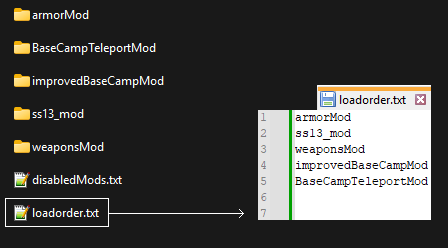
'loadorder.txt' contains the order in which mods are loaded. A mod that is further down, overrides contents of a mod that is further up, in case they both modify the same thing.
Disabling a Mod
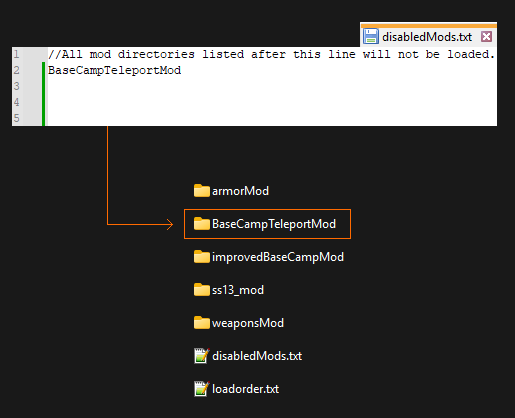
'disabledMods.txt' can be used to exclude mods via their mod-directory name. The game will simply skip it during the loading process.
Sometimes you want to disable a certain mod, but you don't want to delete it from your 'mods'-folder. Perhaps you are trying out a bunch of mod combinations and want to swap things out quickly.
To disable a mod, open the 'disabledMods.txt'-file inside the 'mods'-directory with a text editor. Then simply write the name of the mod in a new line. Don't forget to save after you made your changes.
What counts is the name of the mod's directory. If you renamed it, use the new name you gave it.
When you start the game, the mod will simply not be loaded.
Mods of Mods
Adventures of Conquest allows for mods of mods. Even mods of mods of mods (and beyond), if you somehow want that.
Imagine the following case: Modder 1 creates a complete game overhaul mod, overriding all the vanilla content.
Modder 2 creates a few new weapons for this overhaul, as its own mod.
Loading these is very simple. Just have both in your 'mods'-directory, and make sure your 'loadorder.txt' loads the overhaul mod first, and the new weapons mod after.
Very efficient, and the mod files of the first mod aren't touched. Can't break anything.