The Editor
Functionality Overview
Table of contents
What do all these buttons do?
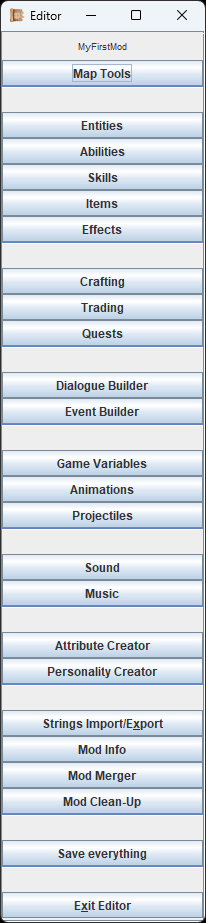
The menu isn't fancy, but it works!
The Editor's main menu is dead simple. These buttons will open all the various menus in which you create everything a mod needs. Each single functionality will be explained in detail on it's own page, but on this page here I will give you a quick rundown of what these do. This basic knowledge will help you to understand how everything is connected.
At the end of the page, you can see a little diagram of dependencies, so it becomes even more clear.
The Editor comes with a 'Usage Finder'-Tool. Anything you have created can be traced back to find all usages, e.g. where and how often did you place a specific Item - and you can jump directly to the source.
Map Tools
Allows you to load, edit and create Maps for your mod. Maps are tile-based and are drawn with the tiles from your '...mods/[YourMod]/gfx/tileset' folder. Each tile in the set can have its own collision type. Using the Map tools, you can also place Entities, Items and Objects onto your Map.
Entities
An 'Entity' in the context of this game is always an NPC or player character. You can create NPCs, hostile or friendly, give them a name, class, equipment, lootable/stealable items, change their attributes, abilities, portraits, body types & much more.
Abilities
Let's you define Abilities which can then be used by the player or NPCs. Abilities have mana- and energycosts, cooldowns, portraits and skill-requirements. What an Ability actually does is defined by its 'Effect' though, which is explained two paragraphs below.
Skills
Very simple menu to create or edit Skills and their skill descriptions. By itself a Skill doesn't do much, but it can be attached to Items, Abilities, Crafting Recipes and e.g. Dialogue checks.
Items
With this you can create your own Items or edit the existing ones. Items can be equippable, usable, consumable or just crafting ingredients. They have value, weight, rarity, portraits, names and descriptions. You can add Effects too!
Effects
Effects determine what an Ability or an Item actually do. The Effect carries the damage type, the attribute changes, the range, the radius, the duration, animations, sound and it even allows for dynamic descriptions that update certain numbers according to the player's own attributes. Effects can be chained together to create some wild stuff!
Crafting
Here you can define crafting recipes. It's an extremely simple process in which you just select all the ingredients and the end product. If needed, you can also define crafting stations here and assign them.
Trading
When buying/selling something at a merchant's shop, you will need a list of items that represents the shop's inventory. This is done here. Just lists of items that you will see in a Trade.
Quests
Quest names, level recommendations, descriptions and awarded experience on completion - that is what you can define here. Quests are started, progressed or finished via 'Events', but we discuss those two paragraphs below.
Dialogue Builder
A really powerful tool to construct dialogues with dynamic speakers, listeners and even dynamic keywords. It is heavily based around the idea that every character has a 'personality', and NPCs can even react to these personalities. To make dialogue more immersive, keywords can be used to address previous speakers, names or classes, and you can even make use of 'Requirements' (If...Then...) to make skill checks, item checks, level checks and much more.
Event Builder
This is where you construct scripted Events from 'EventBits', which are building blocks that are chained together to make things happen. This is not a programming language, and therefore no programming experience is required. An example for an Event could be:
If you interact with this Object then
- A cutscene starts (game is paused, the UI is hidden)
- All player characters walk to tile X=10, Y=20 (with automatic path-finding)
- Then a dialogue is shown
- Then an animation plays on the currently selected player character
- Then an Item is added to your inventory
Even more complex arrangements are possible, checking certain Requirements, switching something from A to B and back, and even controlling vital parts of how the game plays out. Starting a new game is actually not hard-coded in the engine! It just triggers an Event that you can even modify yourself, enabling you to do complete overhaul mods!
Game Variables
Here you can define (Game)Variables, which can contain text or values. These can be accessed by Events and are available from everywhere. Game Variables can even be used as keywords, and implemented in all sorts of texts. A Game Variable might track the progress of a Quest, how many monsters you have defeated, the custom name that you gave to an NPC, the X- and Y- coordinates of your player character at this moment, and much much more. Don't worry, these are super easy to use.
Animations
Here you construct Animations from the frame-sheets that you provided in your '...mods/[YourMod]/gfx/animations' folder. You simply specify how many rows and columns your frame-sheet has, how long each frame is shown and perhaps add some sound or lighting while you are on it. Animations can be played on Objects, Entities, Map tiles, the UI or even replace projectiles. They are also heavily used in Effects.
Projectiles
When using a long-range Ability or a long-range weapon you will most likely want them to fire a projectile. And here you can define that projectile by specifying its texture (or animation), speed, rotation and you can even do some wonky stuff like curves and trails.
Sound
If you added your own sound effects in your '...mods/[YourMod]/sfx/sound' folder, then you will need to define that sound in the Editor and give it an ID. You can also adjust the volume or give it a random pitch every time it plays.
Music
If you added your own music files in your '...mods/[YourMod]/sfx/music' folder, then you will need to define the music pieces in the Editor and give them an ID. You can also adjust the volume and make them loop when played.
Attribute Creator
If you want to come up with some new type of damage or just a very specific attribute like e.g. 'Sanity', then you create those here. Just give them a name, a description and specify what type of attribute you want them to be. By themselves they won't do much, so you have to implement them in Effects and Events.
Personality Creator
That's right, you can create your own personality types! The vanilla game has 6 types, and all dialogues are based around these, but if you add a new one, then every dialogue will be updated with it. Now, writing new lines for your personality for all the existing dialogue is a biiiig endeavor, but if you want to go for an overhaul, then it is absolutely possible to go wild here.
Strings Import/Export
A single, centralized place where all the Strings (Names, Descriptions, Texts) from every NPC, Item, Effect, Ability, UI-Element etc. come together. You can edit them right there, or even export them as a .xls file, which you can edit with Excel or Notepad and then re-import. This allows for translations in all languages, even super-quick machine translations. Or perhaps you just want to do some mass-changes, then this functionality is also the place to be.
Mod Info
Meta-Data for your mod. Holds the very important 'Unique Mod ID' which you need to define, so that no other mods collide with it. Also allows you to change some parameters on how your mod integrates into the game. Before modding anything else, always check and edit the 'Mod Info' first.
Mod Merger
Built-in tool to merge another mod into your mod. This is heavily used in Coop-Modding, so you can merge the changes of your fellow co-modders into the mod master file. The Mod Merger also informs you about duplicates or discrepancies.
Mod Clean-Up
Built-in tool to check for accidental duplicates, that can happen when you make changes to vanilla content. Offers you a complete list of all recommended actions, which you can individually accept or decline, before telling the tool to start the cleanup process.
Save everything
The most important functionality. Saves your changes to your mod datafiles ('...mods/[YourMod]/datafiles/') so that you can test everything right away. You don't even need to close the Editor when doing your in-game tests.
Exit Editor
This will ask you if you want to save before you leave. Should something go wrong during the saving process, this functionality is nice enough to -not- exit when this happens, so you can try again.
Diagram of Dependencies
This doesn't show every single relation (that would be too much overlap), but you can see how dependencies work.
Example: In order for you to learn how to create Effects, you should first know how to create Sounds, Animations, Projectiles and Attributes. Because all of these are used during Effect Creation.
Only one exception: We are going to start with the Map Tools, and get back to it whenever we learned something new that we can apply in there.
If you are following the Guide, continue with a first glance at the Map Tools. We will return to the Map Tools every time we can apply something new in there.