The Editor
Quests
Reminder: Hover your mouse over almost any input, field, selectionbox or button in the Editor to receive tooltips and examples.
Table of contents
The Quest Creator
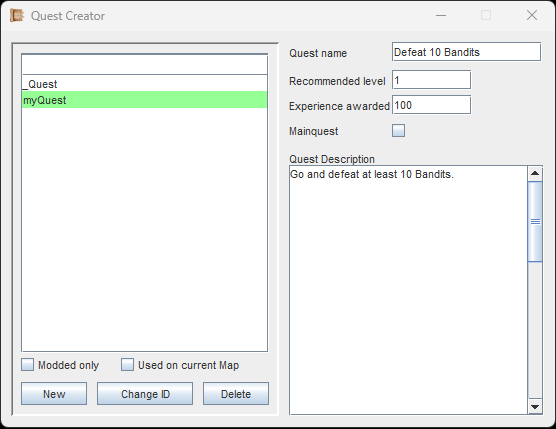
Quests are easy to create and there aren't many settings. Basically, a Quest is an entry in a list, and the actual gameplay contents are put into the world via e.g. Events.
Starting, Completing (or Resetting) a Quest is done via Events. There is no complex logic in the Quest itself.
Create your Quest and give it a unique ID.
The Quest Name will be visible in-game, when the player looks at their quest log.
The recommended level will also be visible in the quest log, and it will appear in red if the player is too far below. The quest can be started and played regardless.
The amount of EXP each player character receives when completing a Quest is specified in 'Experience awarded'.
The checkbox 'Mainquest' simply puts a small star next to the quest name. This way the player can distinguish main quests from side quests.
Lastly, the description of the quest can be adjusted. This is purely to help the player, but it can be formatted with Gamevariable-Keywords and Colored Text.
If you are following the Guide, continue with Objects.