The Editor
Crafting Recipes
Reminder: Hover your mouse over almost any input, field, selectionbox or button in the Editor to receive tooltips and examples.
Table of contents
The Crafting Recipe Creator
Crafting Recipes can be created very quickly. You have to specify Items as ingredients, and an Item as the endproduct. Since Crafting in Adventures of Conquest is skill-based, every single crafting recipe must have a Skill attached.
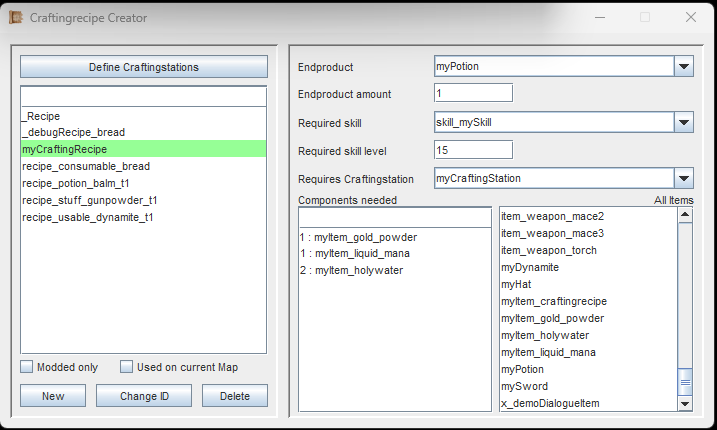
Clicking on the right-side list will add an Item to the component list. Clicking on the left-side list will remove it again.
As usual, we start out by creating a new Crafting Recipe and giving it a unique ID.
The first thing you want to select is the Endproduct, and the Amount of that endproduct this recipe will yield.
Next, you have to select the Skill that this recipe belongs to, along with the required Skill Level.
Via the right item list, you can select all of the Crafting Components (Items) needed for this recipe.
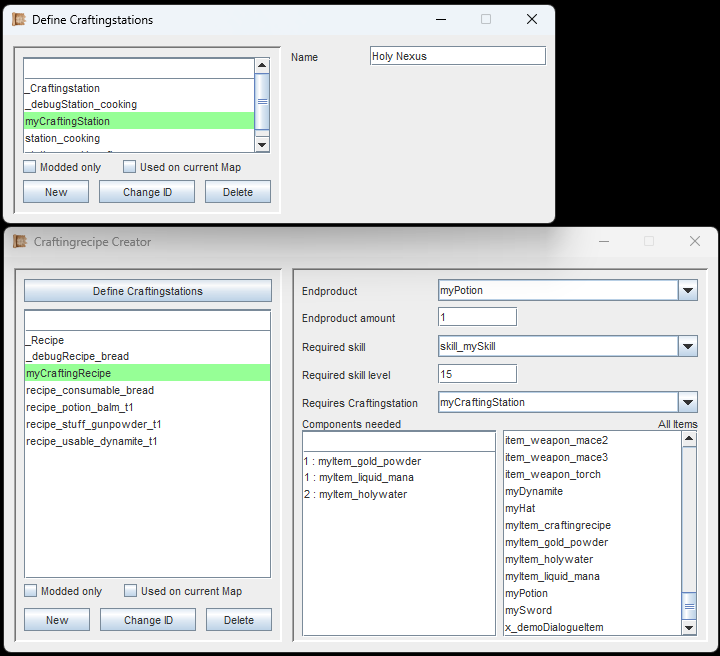
In this example, a new crafting station has been defined, and it has been named 'Holy Nexus'. This crafting station has then been selected in the crafting recipe.
For some recipes, you might want them to require a Crafting Station. To craft recipes that require a crafting station, the player must stand in the immediate vicinity of one. (Placing down Crafting Stations on the Map will be explained later, on the page for Objects).
You can select an existing crafting station, or create your own, by clicking the 'Define Crafting stations'-button.
All a new Crafting Station needs is a unique ID and an in-game name. This name will be displayed in the crafting recipe.
In the image to the left, a new crafting station has been defined, and it was named 'Holy Nexus'.
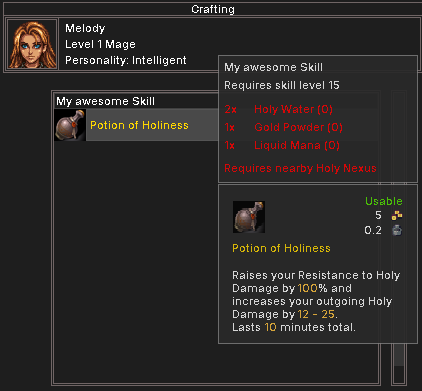
How a crafting recipe looks like in-game.
In the image to the left you can see how the crafting recipe from above will look like in the game.
The player does not have the required items and is not near the required crafting station, so these lines appear in red.
We get back to this when learning about Objects, which can act as Crafting Stations.
If you are following the Guide, continue with Trading Lists.