The Editor
Setting up your Mod Files
Table of contents
Creating your Mod Folder
There are two ways to create your Mod Folder. The easiest is to simply start up the Editor with the Shortcut you made earlier (see Setup), then click on 'New' and give your Mod Folder a name. Alternatively you can create the folder by hand:
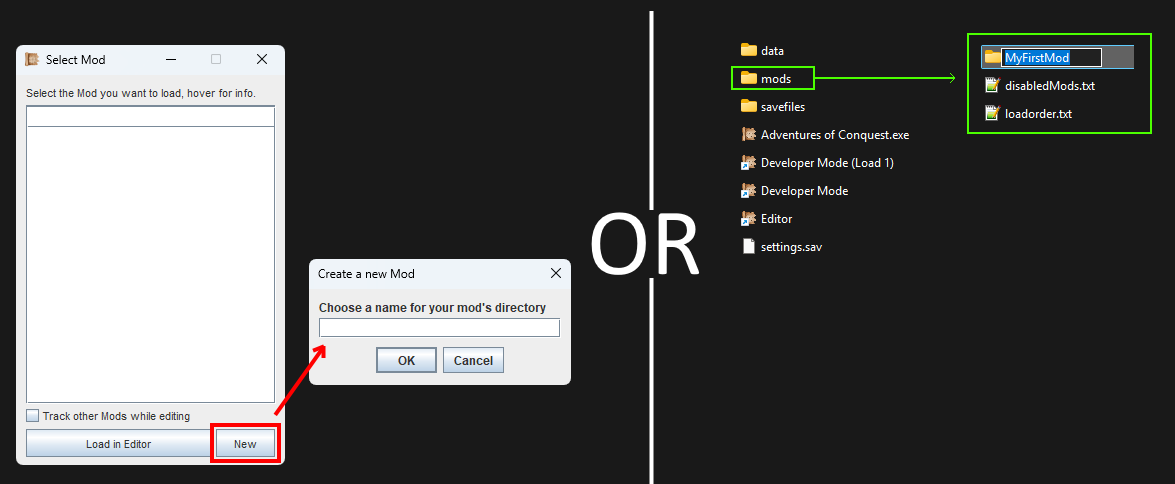
Start up the Editor and click on 'New' to create a Mod.
Or: Go inside the 'mods' directory and create a new folder with the name of your mod.
- Locate the directory where Adventures of Conquest is installed.
- Open the 'mods' directory.
(If it does not exist, start the game normally at least once) - Create a new folder inside, e.g. the name of your mod.
Loading your Mod
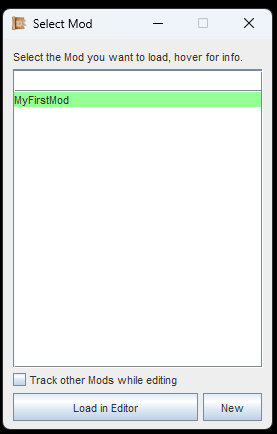
Select your mod folder from the list and then load.
- Start up the Editor with the Shortcut you made earlier if you haven't yet (see Setup)
- Select the mod folder that you have just created (see image).
- Ignore the checkbox, that is for Coop-Modding, not relevant for now.
- Click the button 'Load in Editor'
- After everything is loaded and the Editor has started up, exit or minimize the Editor. We will get back to it later.
Loading your mod for the first time is necessary to create the folder structure.
Mod Folder Contents
Loading your Mod in the Editor for the first time will create the necessary folder structure inside your Mod Folder. If you look inside, there will be a 'gfx', 'sfx' and 'datafiles' directory.
This structure mimicks that of the game master files (the vanilla game), which is inside the data folder. This knowledge is important if you plan to do any texture or audio replacements for the vanilla game (including the UI and the font).
Important: Never make any changes to the 'data'-folder itself. Everything you do is always done in your own mod folder.
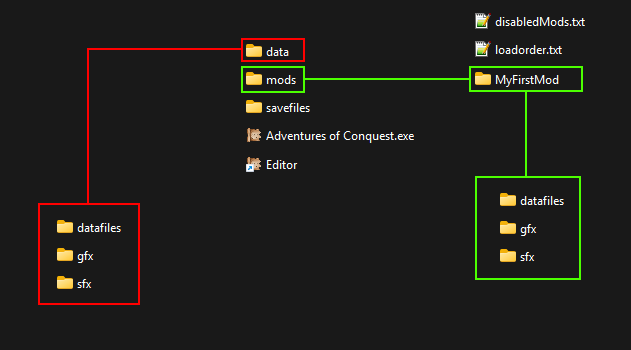
The folder structure of your mod folder closely mimicks the structure of the 'data'-folder, which contains the games vanilla files.
Datafiles, Gfx & Sfx
The folders 'Datafiles', 'Gfx' and 'Sfx' will contain your mod data, textures and audio. The latter two are explained in more detail in Textures and Audio.
You don't need to go into the datafiles folder, as all the files in there are managed via the Editor.
If you are following the Guide, continue with Textures and Audio.