The Editor
Abilities
Reminder: Hover your mouse over almost any input, field, selectionbox or button in the Editor to receive tooltips and examples.
Table of contents
The Ability Creator
Creating Abilities is surprisingly little work! This is because an Ability is merely a shell for an Effect. But why separate them like this? Well, you can also create a usable Item and give it the very same Effect. Like e.g. a Fireball Ability and a one-use scroll that also casts a Fireball. Anyway, let's go through the Ability Creator and find out how it works!
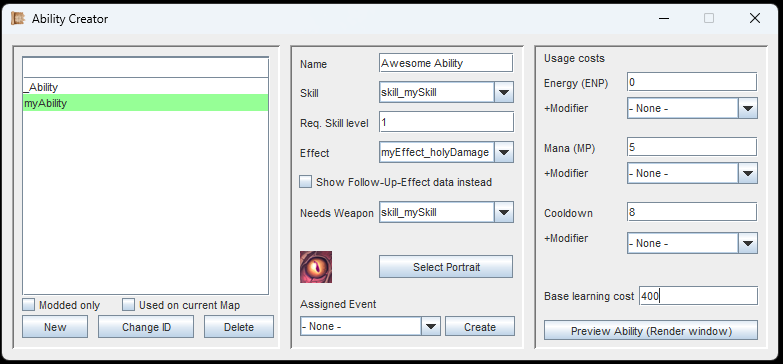
Use the Preview button to check how your Ability looks like while you edit it. Don't forget to assign an Effect, as the Effect holds the description and other data.
As always, you first need to create your new Ability and assign it a unique ID. Once that is done you have some input fields to fill. Let's start with the Name. This is the actual in-game name of the Ability.
Then you need to choose a Skill that this Ability belongs to. Every Ability must have a skill. Also, you have to set the Required Skill Level. The skill level can actually be set to 0. In this case, a player character does not need to know the Skill at all - The Ability will still appear in the menu.
Then, you have to select the Effect, which is what the Ability will actually do. Every Ability must have an Effect. The checkbox for 'Show Follow-Up Effect Data instead' is only used in a few cases, where the Follow-Up Effect is more important then the original one. An Example for this would be a Channeling-Effect. These always need a Follow-Up-Effect, which holds the actual values.
If you check the 'Needs Weapon'-dropdown, you will see a selection of Skills. If one is selected, the player character must have a weapon of that skill-type equipped in order to use the Ability. Example: The Ability 'Flying dagger' requires a weapon with the skill-type 'Dagger' equipped.
If you want to use a custom portrait, make sure to have the texture/texture sheet in your '...mods/[YourMod]/gfx/ability_portrait' folder.
Usage Costs
Abilities can cost Energy or Mana, and they can have a Cooldown. The cool thing: You can also add some modifiers to dynamically influence these costs. To do this, you need to create a Hidden Attribute.
Let's assume you make a 'Fireball'-Ability. You set the Mana-Cost to 10. Then you create a new Hidden Attribute called 'Fireball Cooldown'. You then create a new item with a passive Effect: A ring that decreases the hidden attribute 'Fireball Cooldown' (-6).
Now, when the player equips this ring, the Mana-Cost of their 'Fireball'-Ability is only 4.
The same process applies to Energy and Cooldown.
Previewing your Ability
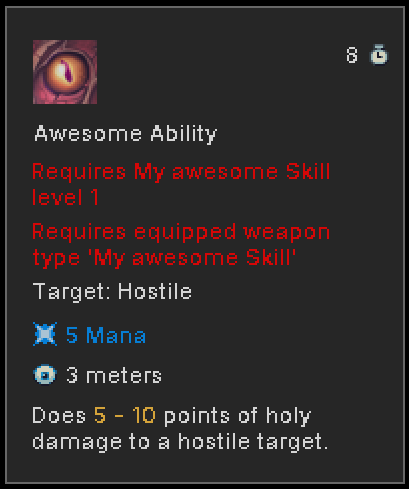
This is an example ability. Previewing can even be done while editing.
Click on the 'Preview'-button in the Ability Creator to preview your Ability inside the render window.
You can edit the Effect of your Ability, Mana/Energy/Cooldown, Portrait or Name, and immediately see your changes.
If you are following the Guide, continue with Items.